How to Re-Enable Mimecast
In some cases, you may need to re-enable the Mimecast Outlook plugin. If Outlook detects that it takes too long to start, it may disable it.
If the Mimecast tab is missing from your Outlook, please try these instructions below.
If the Mimecast tab is present, but missing functionality, please first try restarting the PC, and check this article for details:
Fix "A Connection to the Mimecast service is not currently available" Error Message
Fix "A Connection to the Mimecast service is not currently available" Error Message
1. In Outlook, open File -> Options


2. Select Add-ins

3. In the Manage dropdown menu, select Disabled Items. Press Go...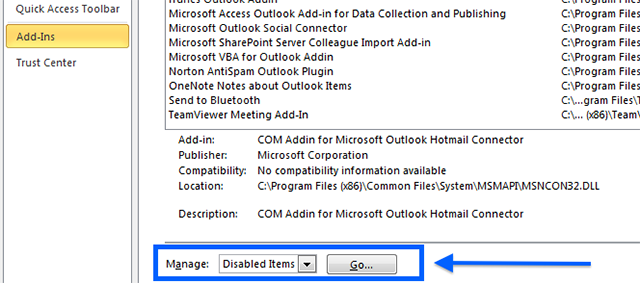
4. If you see the Mimecast for Outlook plug-in in the Disabled Items list, select it and press Enable. If you don't see Mimecast for Outlook in the Disabled Items list, press Close.
6. In the Manage dropdown menu, select Com Add-ins. Press Go...
7. Make sure the Mimecast for Outlook plugin box is checked and Press OK.
The Mimecast tab should return, and functionality should be restored within 15 minutes.
Please open a ticket below, call the Nexus Service Desk at 763-251-6211 or email nexus-servicedesk@nexusfamilyhealing.org if you have any questions.
Estimated Time to complete:
8 minutes (T1+)
Related Articles
Re-enable Zoom in Outlook
Re-enable Zoom in Outlook (nexus-yfs.org) My Zoom buttons in Outlook have disappeared. How do I get it back? In some cases, you may need to re-enable the Zoom Outlook add-in. If Outlook detects that it takes more than one second to start, it may ...Release Held Mail in Mimecast
Release Held Mail in Mimecast Mimecast is our mail protection software. 1. In Outlook, click the Mimecast ribbon at the top. 2. Click on On Hold Messages (Note: If you do not see an "On Hold Messages" option, you may need to SSO authenticate Mimecast ...Re-enable Microsoft Teams in Outlook
Can't create Teams meeting in Outlook? Teams button missing in Outlook? Quick workaround: 1. Open Microsoft Teams 2. Select Calendar on left 3. New Event top-right 4. Make sure to move the "Teams meeting" slider to the right: Method 1: Open Outlook, ...Re-register Your Work Cell After an Email Address Change
Re-register Your Work Cell After an Email Address Change After an email address change, it will be necessary to re-register your work cell phone with the organization. If you have been asked by IT to re-register your work cell, this is necessary for ...Mimecast Advanced Archive Searching
What are the advanced search criteria available when searching the Mimecast archive? Walkthrough The following criteria can be set within the Advanced Search view. Field Description Text List any of the text you want to search for, separating the ...